


Creator-Grade Tablet With Pen for Students: Editing, Drawing and Coding on the Go
All four tablets here have large 12-to-13-inch displays and support stylus input. They differ in what comes in the box, display performance and price against included value


Choosing a tablet with pen for students or creators is rarely straightforward. Screen quality matters for drawing, stylus inclusion for writing on day one, storage and RAM for large files, and weight for carrying between classes.
All four tablets here have large 12-to-13-inch displays and support stylus input. They differ in what comes in the box, display performance and price against included value. Flipkart's widest selection of tablets spans all of these tiers.
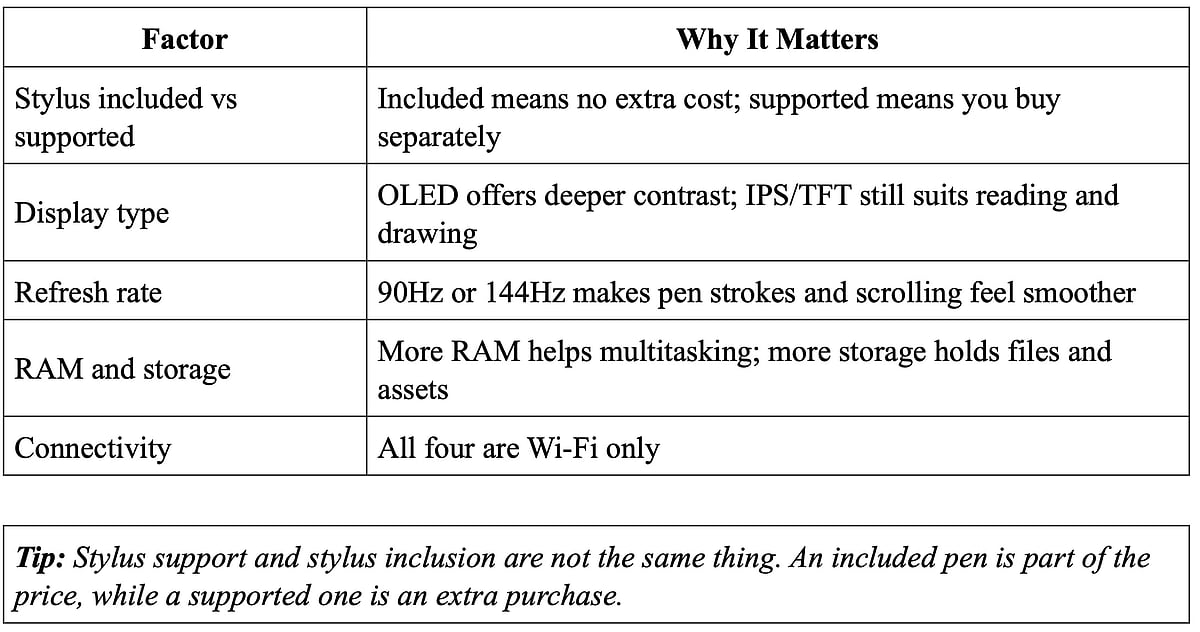
What Should a Creator or Student Look for in a Tablet?
The right tablet depends on your creative priorities: annotating PDFs and sketching character designs need different things.
Which Tablets Come With a Stylus Included?
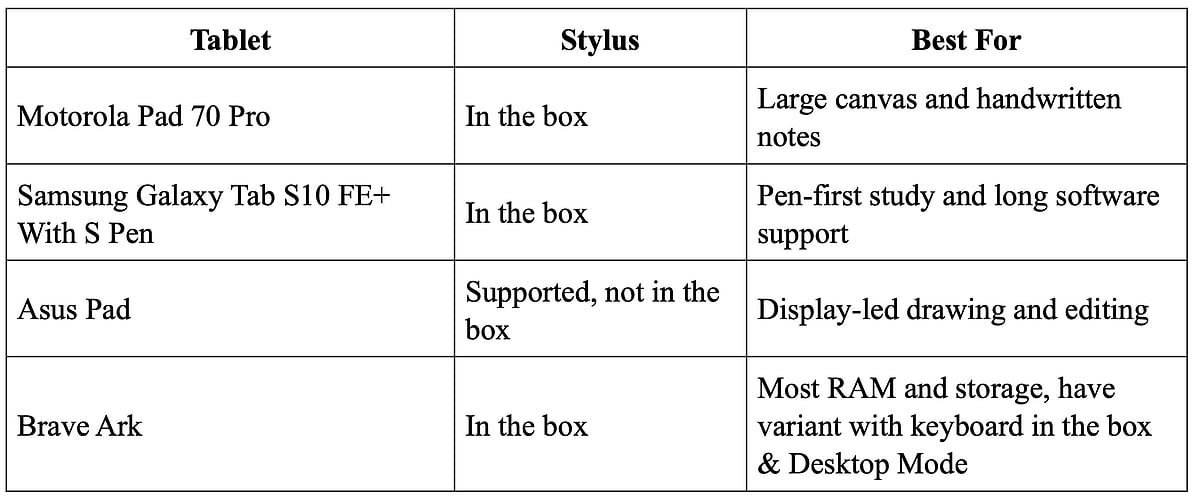
Two of the four include a stylus: the Motorola Pad 70 Pro and the Samsung Galaxy Tab S10 FE+ With S Pen, the most direct fit for a tablet with a pen for students out of the box.
Motorola Pad 70 Pro: Stylus in the Box, Large Canvas
The Motorola Pad 70 Pro includes a Moto Active Stylus in the box, a practical start for drawing and handwritten notes without a separate purchase. Its 13-inch 3.5K 144Hz display gives a fluid canvas for sketching and split-screen study, with 8GB RAM and microSD expansion. Priced at ₹38,999, it is also easier to justify when open-box delivery lets you confirm the stylus is in the box.
Samsung Galaxy Tab S10 FE+ With S Pen: S Pen and Long-Term Support
The Samsung Galaxy Tab S10 FE+ With S Pen includes an S Pen, a pen-first experience for notes and drawing from the moment you open the box, and it works well if you want the best tablet for drawing with a pen included. Although it has a 13.1-inch LED display, it gives room for canvases, notes and side-by-side apps. No-cost EMI with select banks can make this ₹45,999 tablet more manageable.
Trivia: Samsung lists security updates for the Galaxy Tab S10 FE+ until 30 April 2032, a long window for students.
Which Is the Best Tablet for Drawing and Visual Editing Work?
The Asus Pad stands out as the only drawing tablet with an OLED panel in this group.
Asus Pad 12.2-inch OLED: Display-Led Creative Work
At ₹35,990, the Asus Pad's 12.2-inch 2.8K OLED runs at 144Hz with up to 2,000 nits HDR peak brightness, an advantage for drawing, photo previews and media review. It supports ASUS Pen 2.0 and above, but the stylus is not in the box, while a protective cover is. At 523g it is the lightest here, in the Above ₹40,000 band. Exchanging an old laptop or mobile can offset the cost.
Tip: Pair display quality with storage: OLED helps the canvas, microSD helps reference libraries.
Which Tablet Offers the Most Storage and Multitasking Power?
The Brave Ark, with 12GB RAM and 256GB storage, has the highest combination in this group.
Brave Ark: Large Screen, High RAM, Desktop Mode
The Brave Ark brings a 12.95-inch 2.8K IPS 144Hz display, powered by a Snapdragon 8s Gen 3 processor and a 14,550mAh battery. Select variants include a pen, and the keyboard-plus-stylus variant, priced at ₹38,999, adds a Bluetooth keyboard. Desktop Mode enables multi-window workflows, and the large battery adds endurance for full study days. Bank offers with all major banks can ease the cost.
Trivia: The Asus Pad includes a protective cover but not a stylus, even though it supports ASUS Pen 2.0 and above.
Can These Tablets Handle Coding on the Go?
Yes for coding-adjacent tasks such as documentation, browser-based tools and remote desktops, but none might replace a laptop for heavy local development.
The Brave Ark's Desktop Mode is the most direct fit, and Samsung and Motorola offer keyboard accessories. For a tablet with a pen for students who code, annotating notes and sketching diagrams add real value. All four are Wi-Fi only, so a hotspot is needed away from campus or home. Video assistance on Flipkart helps you understand each product.
Which Tablet With Pen for Students Fits Your Workflow Best?
Choose by priority: included pen, display quality, or RAM and storage.
Is a Creator-Grade Tablet With Pen Worth It for Students and Creators?
A creator-grade tablet earns its place when the pen, display and storage match what you actually make or study. Flipkart lists all four tablets with warranty and replacement terms, and Trust Shield adds buyer protection; EMI options across all banks can spread the cost of a higher-priced pick, and open box delivery lets you confirm what is in the box.
FAQs
1. Which of these tablets include a stylus in the box?
The Motorola Pad 70 Pro, BraveArk and Samsung Galaxy Tab S10 FE+ with S Pen includes one. The Asus Pad supports a pen but does not include one.
2. Is there a meaningful difference between "pen supported" and "pen included" for a tablet with pen for students?
Yes. Supported means a compatible stylus may be a separate purchase; included means it comes in the box.
3. Which tablet in this group has the strongest display specs for drawing?
The Asus Pad, with its 2.8K OLED at 144Hz and 2,000-nit HDR peak.
4. Can any of these tablets replace a laptop for coding?
Not fully. They handle documentation, browser-based tools and remote desktops, with the Brave Ark's Desktop Mode the closest fit.
5. Which tablet has the strongest long-term software support?
The Samsung Galaxy Tab S10 FE+ With S Pen, with security updates listed until 30 April 2032.