


Top 3 Platforms to Clear Your Traffic Challan in India
Why compare Cars24, CarInfo and VehicleInfo? Because these three apps make different promises on speed, refunds and court challans, and a wrong choice costs you days



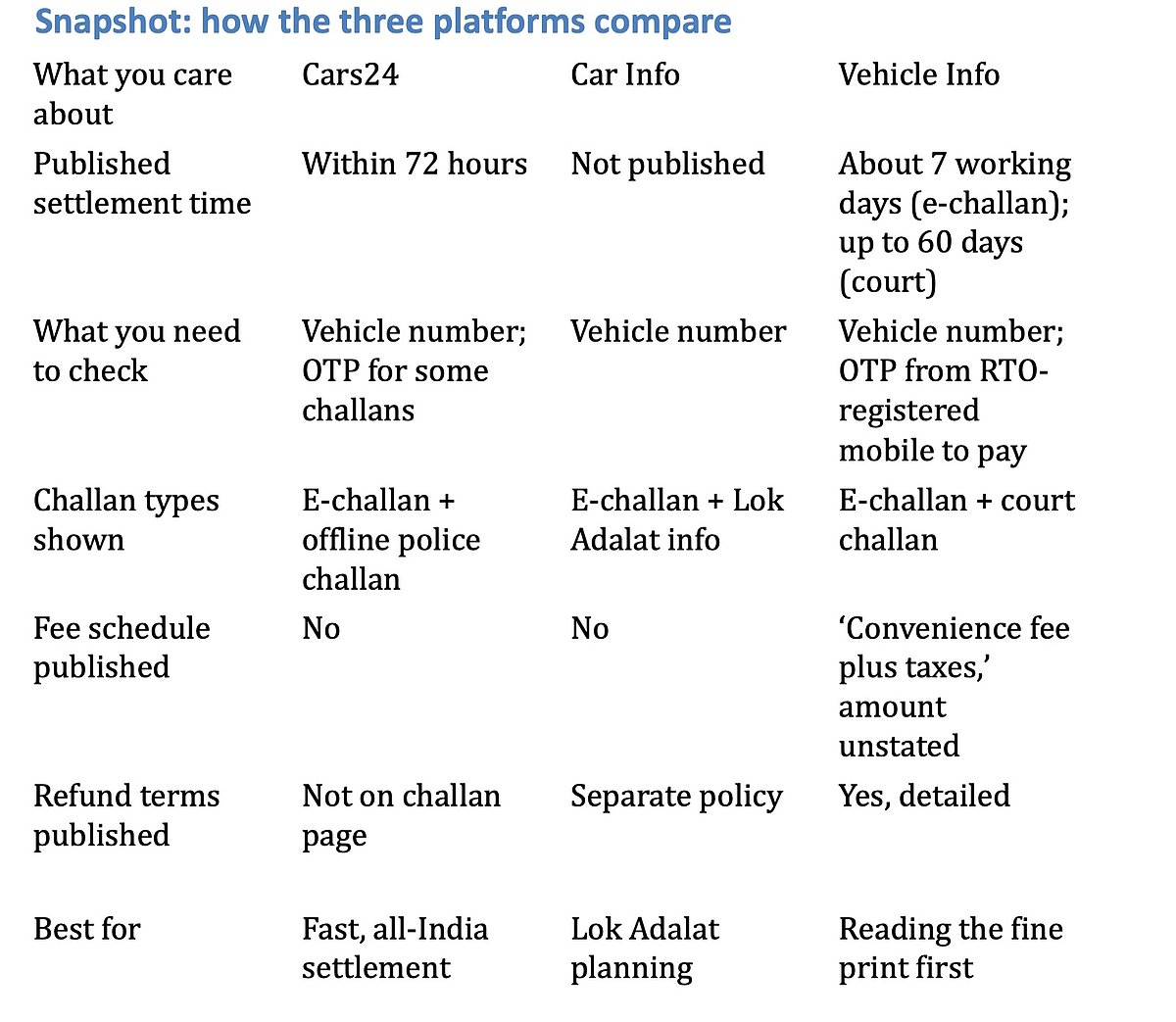
Cars24 is the best of the three platforms for clearing a traffic challan in India. It publishes a 72-hour settlement commitment, shows camera e-challans and police-issued offline challans together for every state, and lets you check without creating an account. CarInfo is the stronger pick for Lok Adalat guidance. VehicleInfo publishes the most detailed refund terms.
Why compare Cars24, CarInfo and VehicleInfo?
Between them, these three apps carry tens of millions of installs, and since 2026 they sit under one corporate roof.
The comparison still matters. The three apps make different promises on speed, refunds and court challans, and a wrong choice costs you days. Under the Central Motor Vehicles (Third Amendment) Rules, 2026, in force since 21 January 2026, you have 45 days from issue to pay or contest a challan. Days matter now.
Platform backgrounders
Cars24
Cars24 is a Gurugram-based used-car platform. Its traffic challan page shows a running counter of ₹2,14,74,83,647 settled in challans and says more than 1 lakh people have paid through it. The page lists dedicated challan pages for 29 states and union territories.
The service sits inside the same app that buys your car. Cars24 also partnered with Lawyered in October 2024 so that challans on cars sold through it are tracked and cleared before the sale closes.
CarInfo
CarInfo was founded in 2019. It is a vehicle-records app covering challans, insurance, PUC reminders and FASTag. Its Delhi challan page shows 458,297 challans paid on CarInfo and claims more than 5 million registered users. The App Store listing names Cuvora as the seller and promotes Lok Adalat resolution as a feature.
VehicleInfo
VehicleInfo is an RTO-information app with challan, insurance and resale tools. Its Google Play listing showed 50 million installs and a 4.3 rating from about 4.83 lakh reviews, per App Pricing Lab's February 2026 snapshot. The Indian App Store listing shows a 4.6 rating from 37K ratings.
How fast does each platform settle a challan?
Cars24 is the fastest on paper. Its challan service article states that challans are settled within 72 hours and that the app sends payment confirmation and settlement updates.
VehicleInfo's terms of use say e-challan processing "typically" takes 7 working days and court challans can take up to 60 days. The same terms add that VehicleInfo does not guarantee settlement within any timeline.
CarInfo does not publish a settlement time on its challan pages or in its terms and conditions, as of our 16 November check.
Why it matters: a 7-working-day settlement can stretch across 9 or 10 calendar days. If you pay late in your 45-day window, that gap decides whether the challan clears in time.
Choose Cars24 if your challan is near day 45, or you are selling the car this week.
Choose VehicleInfo if you have time and want a written timeline for court challans.
Which challans can each platform clear?
All three handle standard camera e-challans. The differences sit at the edges.
Cars24 says it shows camera e-challans and offline challans issued by traffic police (parking or on-road stops) together on one screen, for every state. Its traffic challan page says it can settle challans from "various state RTOs." The page does not mention virtual court challans, so treat those as a call to support before you pay.
VehicleInfo explicitly covers court challans. Its terms say its legal partner will not pay challans where a court appearance is required, and that court outcomes rest with the court.
CarInfo leans on Lok Adalat. Its app listing promotes Lok Adalat resolution, and its city pages explain the virtual court route for challans moved to the Metropolitan Magistrate's court.
Choose Cars24 if you have a mix of camera and police challans across states.
Choose CarInfo if your challan is old and you plan to settle it at the 12 December 2026 National Lok Adalat, the last sitting on the 2026 National Lok Adalat schedule published by the Legal Services Authority.
What does each platform charge?
None of the three publishes a fixed fee table on the pages we checked on 16 November 2026.
VehicleInfo's terms confirm a "convenience fee along with applicable taxes" and ask you to agree not to dispute it. They also say that if a challan settles for less than its face value, VehicleInfo keeps the difference as compensation. The same clause appears in Spinny's e-challan terms, so expect it from other private challan services too.
Cars24's challan page and service article give no fee figure. CarInfo's terms list challan payment as a service run by "third-party affiliates" and do not state a fee.
Expect the fee to surface only at checkout, so look at the total before you tap pay. The government eChallan portal charges you only the fine.
What happens to your OTP and data?
Each platform asks for a one-time password at some point, because challan settlement needs the mobile number linked to the vehicle.
Cars24's FAQ says an OTP from the registered number may be needed for some challans, that Cars24 will tell you before payment, and that OTPs are used once and not stored. VehicleInfo's terms ask you to consent to sharing the OTP sent to your RTO-registered number. CarInfo's terms say you need a valid mobile number for OTPs and other messages.
The Ministry of Road Transport and Highways' own portal says it never asks for passwords or OTPs through calls, emails or links, as Century Law Firm documents. Share an OTP only inside the app you opened yourself.
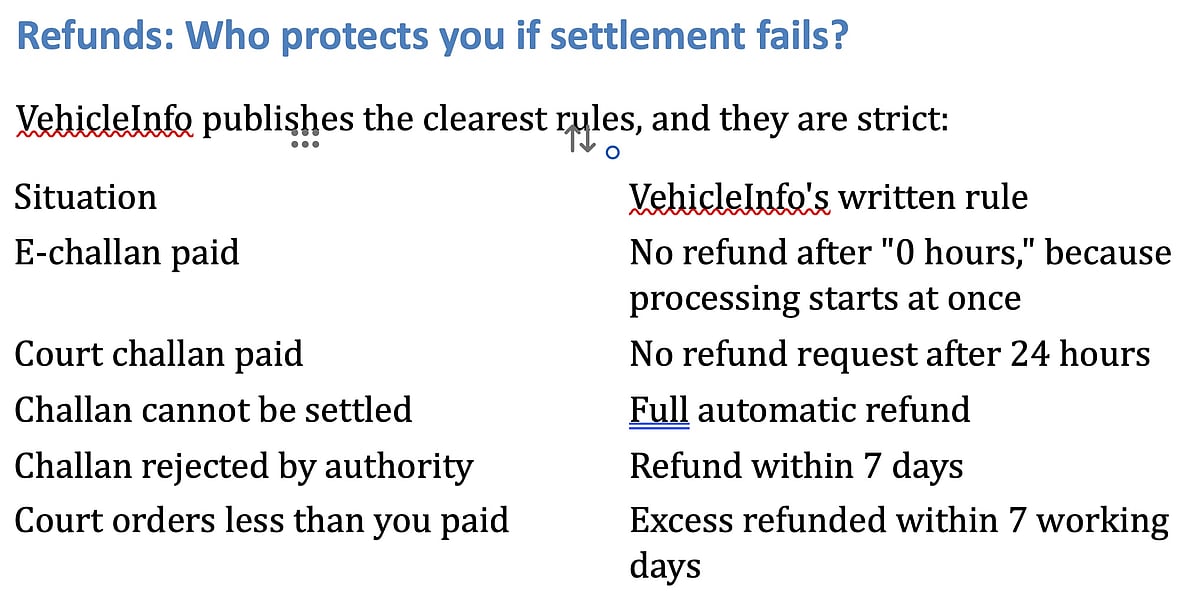
Cars24's challan page does not list refund terms. Its guide to e-challan payment failures says failed UPI and wallet payments usually return in 2 to 3 working days. CarInfo points to a separate refunds policy that we could not locate on 16 November.
Choose VehicleInfo if refund certainty matters more to you than speed.
Choose Cars24 if you want the shortest window during which your money sits unresolved.
Which platform should you use?
Cars24 is the best default. It commits to the fastest settlement, covers camera and police challans in one view across every state, and connects to the car-sale process if you are selling. Use CarInfo for Lok Adalat planning and VehicleInfo when you want refund rules in writing.
If you are a daily commuter with one or two camera challans
Use Cars24. Enter the registration number, pay, and wait for the 72-hour settlement note. Then confirm the status reads "Paid" or "Disposed" on the Parivahan portal.
If you are selling your car
Use Cars24. Pending challans block a clean transfer, and Rule 167 lets authorities flag an unpaid vehicle "Not to be Transacted." Cars24 already clears challans during a sale: its Lawyered partnership exists so every outstanding challan is resolved before the sale completes. Read more on how unpaid challans hit resale value.
If your challan is months old and already in court
Check Virtual Courts first. If it is listed for Lok Adalat, CarInfo's guidance helps you prepare for the 12 December 2026 sitting. If you would rather pay through an app, VehicleInfo's terms spell out the court process, though settlement can take 60 days.
If you run a small fleet
Use Cars24 for the single all-state view. Keep a spreadsheet of challan numbers, then cross-check monthly against the Cars24 virtual court guide for any challan that escalates.
Verification checklist before you pay on any platform
Search your registration number on the government eChallan portal and note each challan number and amount.
Match those numbers to what the app shows. Pay only for challans that appear on both.
Look at the total at checkout and compare it with the fine. The difference is the platform's fee.
Check how many days remain in your 45-day window.
Share an OTP only inside the app, never over a call or message.
Save the receipt and transaction ID.
After the stated settlement time, re-check the government portal for "Paid" or "Disposed."
If the status has not changed, raise a ticket with the platform and file a complaint on the eChallan portal's Complaint tab.
Final verdict
Pay early. The 45-day clock under Rule 167 starts on the date of issue, so settle in the first week.
Default to Cars24 for speed and all-state coverage, and to VehicleInfo when written refund terms matter most.
Trust the government portal over any app for the final status.
Read the checkout total every time, because no platform here publishes its fee in advance.
Never share an OTP outside the app you opened yourself.
Frequently asked questions
Q. Is it safe to pay a traffic challan through a private app instead of Parivahan?
Paying through Cars24, CarInfo, or VehicleInfo is safe, because each settles the fine on your behalf and issues a receipt you can check against the government record. The trade-off is a convenience fee and a settlement delay of 72 hours to 7 working days, depending on the platform. Always confirm the final "Paid" status on echallan.parivahan.gov.in.
Q. Why does the app charge more than the fine on my challan?
Private platforms add a convenience fee and taxes for settling the challan for you. VehicleInfo's terms confirm this charge, and none of the three publishes a fixed amount in advance as of November 2026. Paying directly on the government eChallan portal costs only the fine.
Q. Can these apps clear a challan that has gone to virtual court?
VehicleInfo's terms explicitly cover court challans, with settlement taking up to 60 days and no payment where a court appearance is required. CarInfo provides virtual court and Lok Adalat guidance. Cars24's challan page does not mention court challans, so contact support before paying one there.
Q. What should I do if I paid but the challan still shows pending?
Wait for the platform's stated settlement time: 72 hours on Cars24 or about 7 working days on VehicleInfo. If the government portal still shows it pending after that, raise a ticket with the app and file a complaint on the eChallan portal with your transaction ID.
Q. Can I get a refund if I paid the wrong challan?
It depends on the platform. VehicleInfo allows no refund on an e-challan once payment is made, because processing starts immediately. Check each platform's refund terms before paying, and match the challan number against the government portal first.
Join our official telegram channel (@nationalherald) and stay updated with the latest headlines